
WordPress audits. Diagnosis first, code second.
Architecture, performance, security – we tell you what’s actually wrong before recommending a fix.
An audit that doesn’t sit in a folder. We assess the actual technical state and hand you a concrete action plan, from quick wins to longer-term changes. You can take it to your dev team, your hosting provider, or back to us. Most clients continue with us after the audit.
WHAT WE AUDIT
Five areas. One audit. One actionable plan.
A WordPress audit that goes deeper than automated scans. It translates technical findings into business decisions: where the risks are, where the savings are, what to do first.
01
Architecture and data model
Site structure, content model, multi-site setup, post types and taxonomies, page templates, hierarchy. We look at how the system is organized, where the weak points are, and whether the architecture supports your current scale and what’s coming next.
The result: you’ll know whether planned releases or new features have a foundation they can stand on, before you sign off on budget or timeline.
02
Performance and Core Web Vitals
Server response times, database query efficiency, asset optimization, caching strategy, Core Web Vitals (LCP, INP, CLS) under real load. Not a PageSpeed Insights screenshot, but the architectural causes of slow performance.
The result: a list of fixes that will actually move speed and conversion, and the ones that won’t.
03
Security and access controls
Vulnerability scan across core, themes, and plugins. User account hygiene, permission structures, SSL/HTTPS configuration, malware presence, backup validation. We prioritize remediation by actual business risk, not by the number of automated tool warnings.
The result: a clear list of what to fix first to reduce real incident risk.
04
Code quality and technical debt
Senior engineer manual review of custom code. Automated tools won’t catch the architectural decisions that cost you in every release. We assess plugin sprawl, undocumented modifications, deprecated patterns, brittle integrations.
The result: you’ll know what’s safe to keep, and what’s slowing every change and driving up maintenance costs.
05
Plugin stack and third-party integrations
Every plugin examined: still maintained, license valid, conflict-free, performance impact, security history. Integrations with ERP, CRM, payment gateways, analytics reviewed for stability, sync reliability, and points of failure.
The result: the full map of dependencies and risks that nobody in the organization currently has.
THREE AUDIT TYPES
Three audits, one outcome: clarity.

Architecture audit
Holistic look at the entire WordPress estate – sites, integrations, infrastructure, governance. Designed for pre-implementation planning, post-acquisition consolidation, multi-brand ecosystems where you need a single map of what you actually own.
The result: one document showing where the savings are (eliminating duplicates, consolidating tech) and where the risks sit.
Best for: corporations with portfolios of WordPress sites, organizations planning a major rebuild or migration, post-merger consolidation.

Performance audit
Deep dive on Core Web Vitals, server response, database, caching, asset optimization. For sites losing rankings, conversion, or stability under load when quick fixes haven’t moved the needle.
The result: a list of 5-10 changes with the highest impact on load speed and conversion.
Best for: publishers and high-traffic sites, eCommerce stores during campaign periods, B2B platforms experiencing slowdowns.

Security audit
Vulnerability assessment, hardening review, plugin and theme update status, malware scan, access control review, backup validation. For post-incident recovery or proactive hardening before a compliance deadline.
The result: a concrete list of risks plus a plan to close them, one you can show to your board or to an external auditor.
Best for: sites recovering from a security incident, organizations under compliance pressure (GDPR, ISO, PCI DSS), eCommerce stores handling customer data.

Also available
UX/UI audit – heuristic evaluation, user journey analysis, conversion review. As a separate engagement or alongside any of the three audit types above.
WHO NEEDS AN AUDIT
Familiar situations we know how to assess.
Documentation is incomplete or missing entirely, plugin choices unexplained, custom code without comments. The team is hesitant to make changes because nobody has a clear picture of the architecture. An audit gives you a map and an action plan before any takeover decision, and saves you months of trial-and-error code archaeology.
Whether it’s moving off a legacy CMS, replatforming, or launching a major new feature, an audit before you scope the work protects you from costly surprises mid-project. You know what you’re inheriting before signing off on budget or timeline.
Quick fixes haven’t moved the metrics. Caching alone isn’t enough when the problem runs deeper. The audit identifies the architectural causes, usually a small set of design decisions whose impact compounds as traffic grows. After the audit you know where to invest budget to actually recover speed and SEO revenue.
Post-incident response, GDPR / ISO / PCI DSS deadlines approaching, board-level questions about data risk. An outside assessment gives you defensible documentation and a remediation roadmap that satisfies external auditors and regulatory inquiries.
METHODOLOGY
How a WordPress audit actually works.
STEP 01
Scoping conversation
(30-60 min)
We start with a conversation about what to look at, what’s the business context, and what decisions depend on the audit’s findings. The scope determines depth, not just coverage.
STEP 02
Discovery and access
Read-only access to the code repository, hosting, analytics, and monitoring. Documentation review (or a note where it’s missing). We don’t touch anything in production.
STEP 03
Assessment
Automated scans for security vulnerabilities, performance bottlenecks, and code quality. Then a senior engineer manual review, because automated tools miss architectural issues and over-flag things that don’t matter in your context.
STEP 04
Analysis and prioritization
Findings ranked by business impact, not just technical severity. A vulnerability in a deactivated plugin matters less than a daily-running query that’s slowing your database to a crawl. The audit tells you what to fix first.
STEP 05
Report and walkthrough
Written report delivered in a structured format. Then a 60-minute call with your team to walk through findings, answer questions, and discuss next steps. The report is yours either way.
WHAT YOU GET
Deliverables you can act on.


Executive
summary
One-page overview written for non-technical stakeholders. Top findings, business impact, recommended next steps.


Prioritized
findings
Categorized as critical, high, medium, low. Each finding includes what we found, where it is, business impact, remediation effort, and recommended action.


Technical detail per finding
Enough context for your dev team to act without coming back to us. Code references, log excerpts, configuration notes, screenshots where useful.


Remediation
roadmap
Sequenced action plan. What to fix first, what to bundle into a sprint, what to plan for the next quarter. You can hand this to your dev team, to a different vendor, or to us.


60-minute call
Live session with the senior engineer who ran the audit. Q&A, prioritization discussion, advice on sequencing. The value is not just the report. It’s the conversation around it, where we help you interpret findings in your business context.

After the audit
Most clients move into one of four paths. Rescue mission when findings show the system needs immediate stabilization. Custom WordPress development when the right answer is a rebuild. Performance optimization when the focus is Core Web Vitals and infrastructure. Growth & Care when you want a long-term engineering partner.
CASE STUDIES
WordPress in practice.
-

ND Channel

ND Channel is a US-based wholesale jewelry manufacturer producing made-to-order pieces – rings, bracelets, earrings – for jewelry retailers across the United States. The company operates on a build-to-order model where every piece is individually priced and produced, meaning the speed and accuracy of quoting directly shapes the customer experience and the business’s competitive position.
-

Enostrada
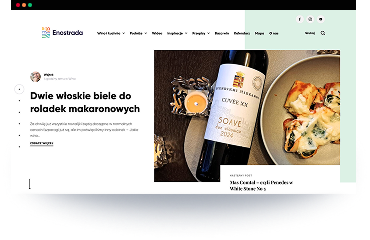
A lifestyle media project created by three enthusiasts: Robert (wine expert), Wojtek (culinary creator) and Kamil (travel & experiences). Their vision: a single modern platform combining wine, food, travel, and events, supported by high-quality articles, reviews, pairings and guides.
-

LernerPython
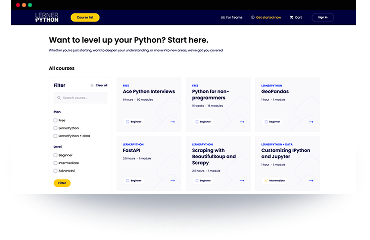
LernerPython is a premium membership-based e-learning platform created by Reuven Lerner, an internationally recognised Python educator and author. The platform provides: structured Python courses, weekly coding challenges, community access via Discord, long-term memberships for developers at different skill levels.
Questions about
WordPress audits.
Five areas: architecture and data model, performance and Core Web Vitals, security and access controls, code quality and technical debt, plugin stack and third-party integrations. The depth in each area depends on the audit type – architecture, performance, or security focused. A senior engineer reviews everything manually after the automated scans run.
No. The report is yours. We’re explicit about that up front because the audit should be useful regardless of who fixes the findings – your team, another vendor, or us. Most clients do continue with us, but only because the audit reveals work that fits our specialization.
Automated tools surface symptoms. They tell you a page is slow, or that a plugin has a known vulnerability. They don’t tell you why the page is slow at the architecture level, or whether the vulnerable plugin is actually exposed in your specific setup. A senior engineer audit interprets the automated output, identifies architectural causes, and prioritizes by business impact, not just technical severity.
Yes. This is the most common starting point. An audit before a rebuild, migration, or partnership decision tells you exactly what you’re working with.